
What is a course video introduction?
A course video introduction is a promotional video a member sees when they open your course for the first time, right above the lesson list. It's their first real experience of you as a teacher, before they've pressed play on a single lesson.
Its job is to convince someone to start the course. For members who aren't yet subscribed, that also means deciding whether to subscribe. So think of it less as a welcome message and more as a concise, illustrative pitch: what the course is, who it's for, and why it's worth their time.
Why does every course need a video introduction?
Moving forward, every course, audio or video, needs a video introduction. This replaces the old audio introduction.
We're making this change to help Insight Timer members find the course that suits them. Your introduction is often the first real impression someone has of you as a teacher, and video lets a prospective student see and connect with the person behind the voice: the warmth, the presence, the way you talk. That familiarity builds trust, and trust is what turns a browse into a sign-up.
Your course content itself isn't changing. If you teach an audio course, it stays an audio course. Only the introduction is moving from audio to video.
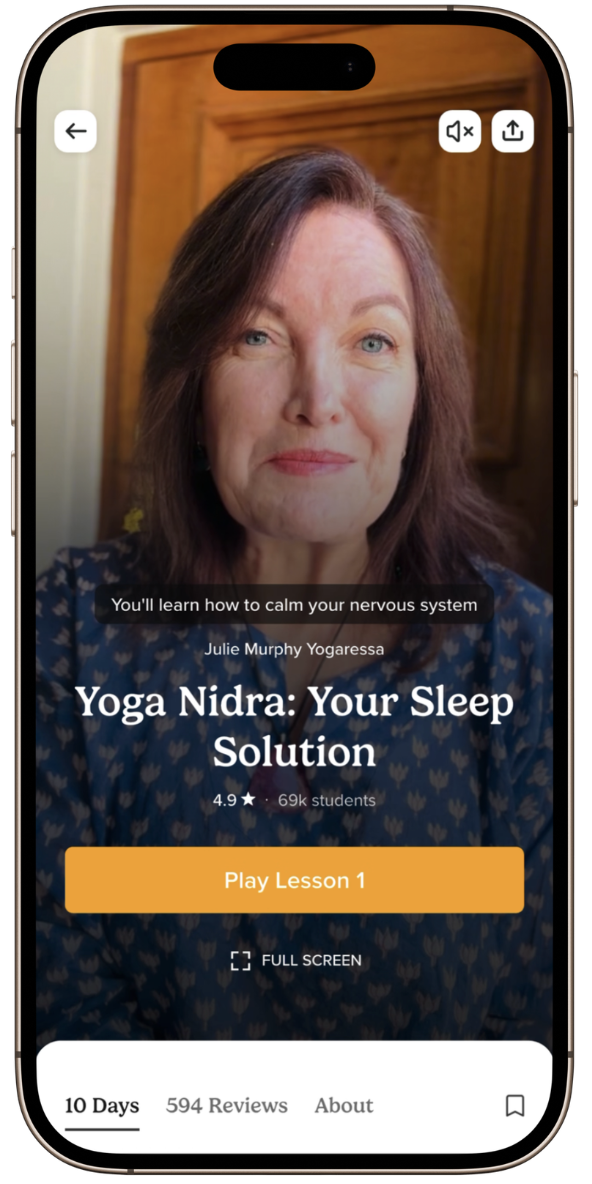
Requirements:
- Portrait orientation. We can't accept landscape video, or portrait video with black bars at the top or bottom.
- Length: 1 minute minimum, 4 minutes maximum. Most strong introductions land between 1.5 and 3 minutes.
- No on-screen graphics. That means no burned-in captions or subtitles, and no titles, watermarks, counters, or text overlays of any kind.
- Clear audio. Your voice should be easy to hear, with no echo or background noise.
Filming on your phone is completely fine. Your introduction doesn't need to be polished or professionally produced.
Recommendations:
- Be on camera. You don't have to be, but we strongly recommend it, especially for audio courses, since this is often the only time a student sees your face.
- Keep your entire face in the top half of the frame. You don't want any part of your face hidden behind on-screen graphics or subtitles.
- Put natural light in front of you, not behind you. A window you're facing works far better than one at your back.
- Keep the camera still. Prop your phone against something solid, or use a tripod.
- Record somewhere quiet. A small, soft-furnished room cuts echo. Stay close to the device, and switch your phone to Do Not Disturb so notifications don't land mid-sentence.
- Choose a tidy background. Film somewhere that reflects your course and won't distract. Avoid screens, mirrors, and cluttered spaces.
Sample reference: Attachment Styles: Understanding Your Relationship Patterns
Is there a structure I can follow?
Introductions play as people scroll through the app, so the first few seconds are critical. If you're not sure where to start, work through these beats:
- Open with a hook. Lead with the problem or the promise, not your name. "If you lie awake replaying your day, this course is for you." Avoid opening with "Hi everyone, welcome to my course."
- Introduce yourself briefly. One or two sentences: your name, what you do, and the single most relevant piece of experience. Save the full biography for your profile.
- Introduce the course. The title, and the one-line version of what it is.
- Say who it's for. Let the right person recognise themselves. It's fine to name who it isn't for.
- Explain what's inside and how it works. Structure and time commitment together. Be explicit about whether the lessons are audio or video, since the introduction is now video either way. For example: "In this 10-day audio course, I'll help you…" or "Across seven audio lessons, we'll explore…"
- Give a taste of the teaching. One usable technique, reframe, or line of guided practice, in your teaching voice. This is often the most persuasive part.
- Name what they'll walk away with. Be concrete rather than aspirational.
- Say why you, and why this course. What you bring that a similar course on the same topic doesn't.
- Share proof, if you have it. Student numbers, ratings, or a testimonial. Read these aloud, since nothing can appear on screen. Skip this beat if you don't have it yet.
- Close with an invitation. A clear, warm last line: "If that sounds like what you need right now, I'll see you in the first lesson."
The order is flexible. Strong proof can move to the top, and a compelling teaching sample can open the video. The hook and the close are the two beats that should stay where they are. If a beat doesn't apply, cut it. A tight 60 seconds beats a padded 4 minutes.
Do I have to appear on camera?
We strongly encourage you to appear on-camera, speaking directly to your audience; it's one of the fastest ways to build trust and help build a connection. We understand that isn't always possible, though, so it's not mandatory. Voiceover trailers are also accepted, as long as the visuals (b-roll) clearly support the offering you're promoting.
If you'd rather not show your face on camera, here are some options:
- Slow, steady footage of nature or your practice space. Gentle movement reads better than a static shot.
- Hands only: turning pages, holding mala beads, resting in a mudra, pouring tea, journaling
- A wide or side-on shot of you practicing, with your face out of frame
- Abstract texture and light: water, fabric, shadows moving across a wall, sunrise through a curtain
- A lit candle, a plant swaying in a breeze, curtains billowing in a window, a simple altar or practice space
- Keep it calm and consistent with your live event's tone. Avoid busy cuts, stock-looking montages, or anything that competes with your voice.
Prefer not to film at all? Free, royalty-free stock footage works just as well. Sites like Pexels and Pixabay have plenty of nature and lifestyle clips you can drop straight in, often with more polish than a phone recording.
Where do I upload my course introduction video?
In your course uploading form, go to the Promo step. Under "Upload your course introduction," you can either upload a video (MP4, portrait 9:16, 1–4 minutes, up to 500MB) or record one directly using your webcam.
I already have a published course with an audio introduction, can that help me record my video?
Yes. If your course previously had an audio introduction, you'll see a "Need help getting started?" section below the upload area with your original audio, its transcript, and options to download either one. Play the audio or read the transcript while you record, so you can reuse the same content in your new video introduction.
I already have a video course with a video introduction, can I use it?
Sure, as long as it's recorded in portrait. Most existing video course introductions we've seen are in landscape, so if that's the case for yours, please re-record it in portrait. This is also a good opportunity to re-record your introduction to make sure it opens with a strong hook, if it doesn't already.
Here's what the upload tool looks like in your teacher dashboard

You're welcome to update your video introduction at any time. Many teachers do this periodically, especially to call out a growing number of happy students or new reviews as they come in.
Get support
If you have questions about recording or uploading your video introduction, reach out through the teacher chat on your dashboard or email us at publishers@insighttimer.com.